Most office safety meetings fail because they’re either too vague or feel irrelevant. “Slip, trip, and fall” gets mentioned every quarter, but no one recalls what specific action they should take near the coffee station. Real behavior change comes not from repeating platitudes, but from targeted, relatable discussions—toolkit-style conversations that address actual risks in an office environment. These aren’t construction site stand-ups; they’re concise, focused safety talks designed to keep desk workers aware, alert, and accountable.
Done right, office safety toolbox talks prevent minor incidents from escalating and build a culture where employees feel responsible for their environment. Below are high-impact topics with practical applications, real-world examples, and mistakes to avoid.
Why Office Toolbox Talks Matter More Than You Think
People assume offices are “safe” because there’s no heavy machinery. But OSHA reports that slips, trips, falls, ergonomic injuries, and fire hazards are among the top causes of non-fatal workplace injuries—even in administrative settings. The average office worker spends 1,700+ hours a year at their desk. Over time, small risks compound: a frayed power strip, an overloaded outlet, or poorly arranged cables can lead to fires or trips.
Toolbox talks work because they’re short (5–10 minutes), timely, and tied to observable conditions. When done weekly or biweekly, they keep safety top of mind without disrupting workflow. The key is relevance. Talking about forklift safety in a back office full of accountants won’t stick. But discussing how to safely lift a box of printer paper? That lands.
Common mistake: Treating toolbox talks like compliance checkboxes. If the session feels like a lecture, engagement drops. Instead, frame it as a team huddle—everyone shares observations, asks questions, and suggests improvements.
Top 8 Office Safety Toolbox Talk Topics
with Real Use Cases
#### 1. Slip, Trip, and Fall Prevention
Even in carpeted offices, slips and trips account for over 25% of reported incidents. The root causes? Wet floors from cleaning crews, loose rugs, open desk drawers, and cables across walkways.
Practical example: A marketing assistant in Chicago tripped over a retractable badge lanyard cord stretched across a hallway. She broke her wrist. The team later discussed rerouting badge stations and using floor cord covers.
Discussion prompts: - Where do you see tripping hazards in our workspace? - Who’s responsible for reporting spills or damaged flooring? - How can we better manage temporary cable runs?
Actionable tip: Use red “wet floor” signs even for minor spills. Designate a “hazard spot check” role during team meetings.
#### 2. Ergonomics and Desk Setup
Poor posture, non-adjustable chairs, and monitors at eye-incorrect height lead to chronic back, neck, and wrist pain. The cost? Lost productivity and higher insurance claims.
Real use case: An IT support team in Denver reported recurring wrist pain. After a toolbox talk on ergonomics, they requested vertical mice and monitor arms. Within three months, self-reported discomfort dropped by 60%.

Checklist to share: - Feet flat on floor or footrest - Elbows at 90°, wrists neutral - Top of monitor at or slightly below eye level - Chair lumbar support aligned with lower back
Mistake to avoid: Assuming one-size-fits-all. Offer adjustable furniture and encourage personalized setups.
#### 3. Electrical Safety and Power Management
Overloaded outlets, daisy-chained power strips, and damaged cords are fire hazards. Offices often underestimate how quickly power demands add up—especially with space heaters, multiple monitors, and charging stations.
Example: A startup in Seattle had a near-miss when a power strip started smoking after being used to run six devices simultaneously. The team later adopted a “one strip per circuit” rule.
Talking points: - Never plug power strips into other power strips - Report frayed or warm cords immediately - Unplug non-essential devices after hours
Pro tip: Use smart power strips that cut power to peripherals when a computer shuts down.
#### 4. Emergency Evacuation and Exit Routes
Many employees don’t know evacuation routes, assembly points, or how to react during a fire alarm. Drills are rare, and when they happen, people treat them like an inconvenience.
Use case: During a fire drill in a Midtown Manhattan office, only 40% of staff exited within two minutes. Follow-up talks focused on mapping personal escape paths and identifying primary/secondary exits.
Discussion questions: - Can you describe two ways out from your desk? - Where is the nearest fire extinguisher? - Do you know the evacuation signal?
Action step: Conduct unannounced mini-drills. Reward teams who evacuate fastest and most calmly.
#### 5. Mental Health and Psychological Safety
Workplace stress, burnout, and isolation are silent safety issues. An employee under extreme stress is more likely to make errors, ignore protocols, or disengage from team safety.
Real-world impact: After a series of missed deadlines and tense meetings, a finance team had a toolbox talk on mental load. They introduced “no-camera Fridays” and a shared “quiet hours” calendar.
Topics to explore: - Recognizing signs of burnout - How to respectfully check in on colleagues - Using PTO without guilt
Limitation: Not therapy—but normalizing discussion reduces stigma and fosters support.
#### 6. Office Equipment Safety
Printers, shredders, binding machines—these aren’t just tools; they’re potential hazards. Paper jams tempt users to reach in while machines are running. Shredders can cause lacerations.
Example: A legal assistant in Atlanta injured her finger pulling paper from a jammed shredder. The injury prompted a talk on lockout procedures—even for small equipment.
Safety reminders: - Unplug before clearing jams - Never bypass safety guards - Label malfunctioning equipment immediately
Workflow tip: Create a “broken equipment” digital form that routes to facilities instantly.
#### 7. Personal Belongings and Workspace Clutter
Cluttered desks, bags in aisles, and personal items blocking emergency exits create both safety and security risks. During an evacuation, clutter slows egress. It also increases tripping hazards.
Observation: In a Boston office, a rolling chair blocked a fire door during a drill. The team later implemented “clear path” audits before long lunches.
Rules to reinforce: - Keep aisles at least 28 inches wide - Store bags under desks or in lockers - No personal items near exits or electrical panels
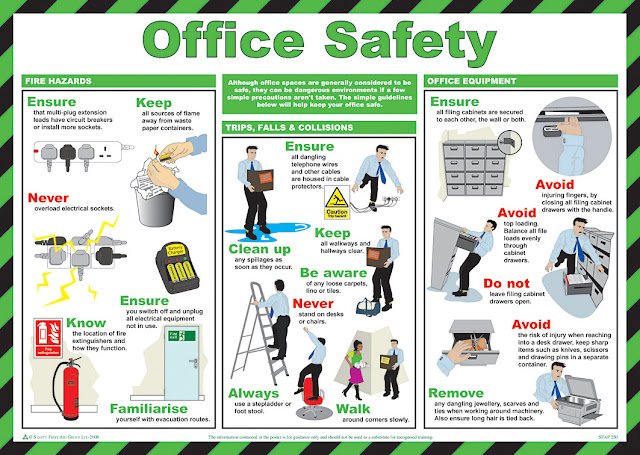
Engagement tactic: Run a “neat desk, safe desk” challenge with small rewards.
#### 8. Cybersecurity as Physical Safety
Cybersecurity isn’t just IT’s job—it’s a workplace safety issue. A phishing attack can lock down systems, halt operations, and even compromise building access controls.
Use case: A HR manager clicked a phishing link that installed ransomware. The office couldn’t process payroll for two days. A follow-up talk emphasized how digital discipline protects everyone.
Discussion points: - How to spot suspicious emails - Importance of locking screens when away - Reporting incidents immediately
Pro move: Simulate phishing tests and discuss results in a blame-free way.
How to Run Effective Toolbox Talks (Without Wasting Time)
- The best talks follow a simple structure:
- Open with a real incident or near-miss (e.g., “Sarah almost tripped this morning near the pantry”)
- Explain the risk and why it matters
- Engage the team—ask for input
- End with one clear action step
Avoid monologues. Rotate facilitators. Keep it under 10 minutes. Use visuals: photos of hazards, diagrams of evacuation routes, or short videos.
Schedule tip: Hold talks on the same day each week—e.g., every Tuesday at 10:00 a.m. Consistency builds habit.
Integrating Toolbox Talks Into Your Safety Culture
This isn’t about adding meetings. It’s about changing behavior. Track progress by: - Counting hazard reports before and after talks - Monitoring incident rates - Surveying employee perception of safety
When employees start pointing out loose cables or suggesting ergonomic upgrades unprompted, you’ve succeeded. The goal is ownership—not compliance.
One real win: A remote-first company started monthly virtual toolbox talks via Zoom. They used screen sharing to tour home office setups. Participation increased by 70% because it felt personal and relevant.
Final Takeaway: Make Safety Conversational, Not Compliance-Driven
Office safety toolbox talks shouldn’t feel like corporate mandates. They’re quick, peer-driven conversations that solve real problems. Focus on clarity, relevance, and action. Rotate topics quarterly, but revisit high-risk areas (like slips and ergonomics) every few months.
Start your next talk with: “What’s one thing you’ve noticed this week that could be a safety issue?” You’ll be surprised what people say.
FAQ
What is a toolbox talk in an office setting? A short, focused safety discussion—typically 5–10 minutes—on a specific office-related hazard, designed to raise awareness and prompt safe behavior.
How often should office toolbox talks be held? Biweekly or monthly is ideal. High-risk periods (e.g., holiday setups, new equipment) may require additional sessions.
Who should lead office safety talks? Rotating team members—not just managers. This builds engagement and spreads ownership.
Are toolbox talks mandatory? Not always legally required in offices, but highly recommended. They fulfill due diligence and reduce liability.
Can toolbox talks be done remotely? Yes. Virtual sessions with screen-shared photos, polls, or home office walkthroughs work well for hybrid or remote teams.
How do I keep employees engaged? Use real examples, ask for input, keep it short, and follow up on action items. Avoid lectures.
What should be documented after a talk? Keep a simple log: date, topic, facilitator, key points, and any actions taken. Useful for audits and tracking trends.
FAQ
What should you look for in Office Safety Toolbox Talk Topics That Actually Work? Focus on relevance, practical value, and how well the solution matches real user intent.
Is Office Safety Toolbox Talk Topics That Actually Work suitable for beginners? That depends on the workflow, but a clear step-by-step approach usually makes it easier to start.
How do you compare options around Office Safety Toolbox Talk Topics That Actually Work? Compare features, trust signals, limitations, pricing, and ease of implementation.
What mistakes should you avoid? Avoid generic choices, weak validation, and decisions based only on marketing claims.
What is the next best step? Shortlist the most relevant options, validate them quickly, and refine from real-world results.